Admin Guide · Setup
Activity log
When a tenant behaves differently than it did last week, somebody changed something. This is the record of who, what, and when. Scroll it, then learn to narrow it to one question.
- Timeline
- Filter
- Read
Scroll
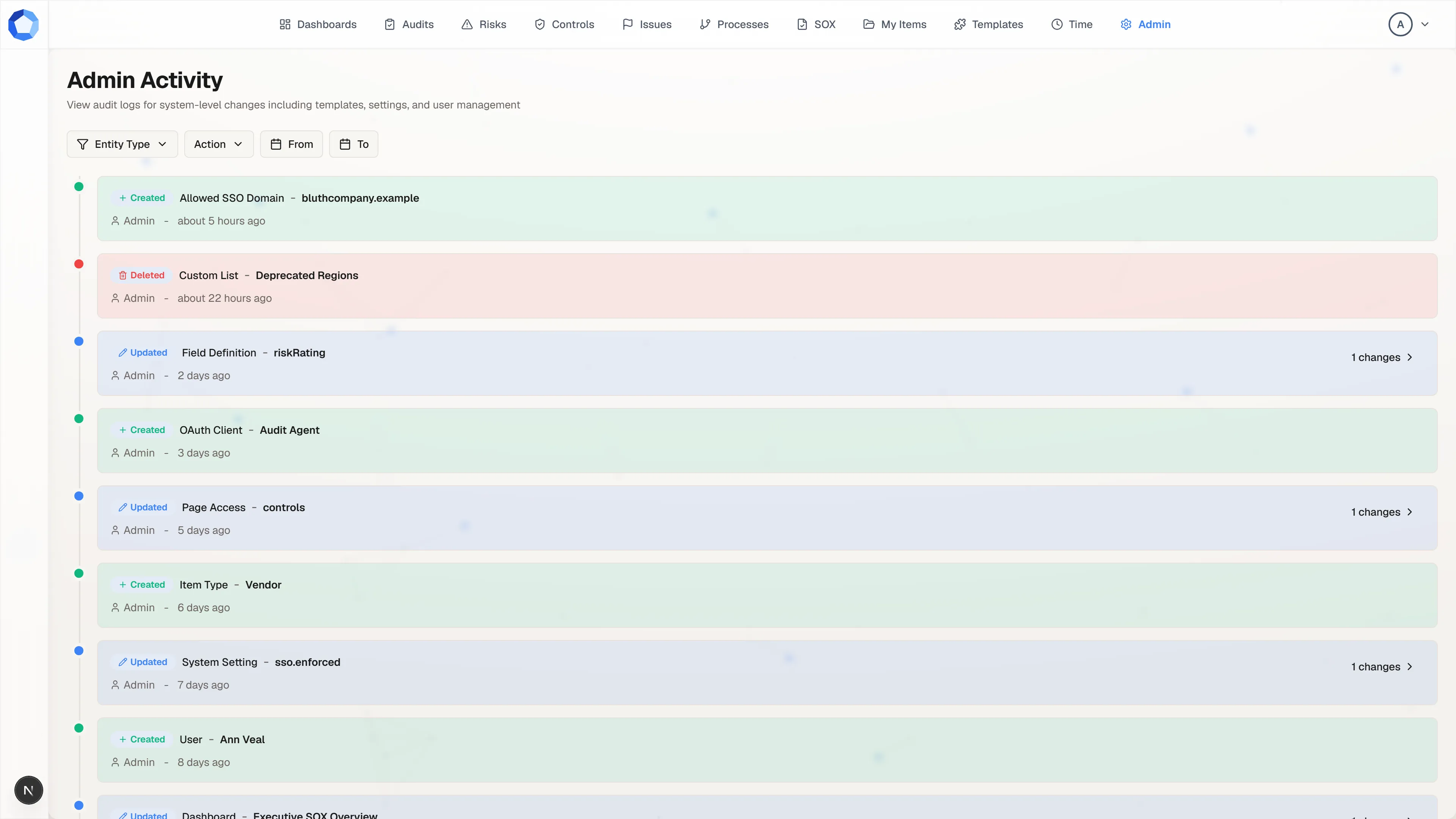
Admin Activity, from the Administration page, is the audit trail for the configuration layer: item types, settings, templates, users, and access. It answers questions about how the tenant is set up, not about what happened on any individual record.
One timeline, newest first
Section titled “One timeline, newest first”Every system-level change lands here as a row: a colored marker, the action as Created, Updated, or Deleted, the kind of thing that changed, its name, then the person who did it and how long ago.
Read a stretch of it and the shape of a configuration effort is obvious. An SSO domain added, a custom list deleted, a field definition edited, an OAuth client created, a page grant changed: work that happened across five different admin screens arrives here as one sequence.
Narrow it to the question you actually have
Section titled “Narrow it to the question you actually have”Four filters sit above the feed. Entity Type picks what kind of thing
changed, from workflow templates, dashboards, item types, field definitions,
system settings, custom lists, allowed SSO domains, users, page access, item
permissions, and OAuth clients. Action picks CREATE, UPDATE, or
DELETE. From and To bound the dates.
Filter before you scroll. “Every page-access change since the first of the month” is one Entity Type plus one From date, and it turns an unreadable timeline into a short, answerable list.
Open the change itself
Section titled “Open the change itself”An Updated row carries a changes count on the right. Expanding it shows what the update actually did, rather than leaving you to infer it from the entity name.
That is the difference between the log confirming that something changed and the log telling you what it changed to. When you are reconstructing why a person lost access or why a field stopped filtering, the expansion is the part that answers it.
What is recorded here
Section titled “What is recorded here”| Entity type | Recorded when |
|---|---|
| Users | An account is created, promoted, demoted, or deactivated. |
| Page Access | A page toggle is granted or revoked for someone. |
| Item Permissions | A view or edit grant on a record is added or removed. |
| Item Types | A type is created, edited, or deactivated. |
| Field Definitions | A field is added, changed, or removed from a type. |
| Custom Lists | A list value is created, edited, or deleted. |
| Workflow Templates | A template is created, edited, or deleted. |
| Dashboards | A dashboard definition changes. |
| System Settings | A tenant-wide setting is changed. |
| Allowed SSO Domains | A sign-in domain is added or removed. |
| OAuth Clients | A client is registered, rotated, or deactivated. |
What is not recorded here
Section titled “What is not recorded here”Activity on an individual record, a status change, a field edit, a comment, a document, lives on that record, alongside its fields and relationships. This log is the configuration and access layer only.
That split is deliberate and it is worth remembering when you are looking for something: “who changed this risk’s status” is a question for the risk, and “who gave Ann access to Risks” is a question for this page.
Where an agent’s work shows up
Section titled “Where an agent’s work shows up”An approved suggestion applies as the person who approved it, under their permissions. So a change an agent proposed and a person approved appears the same way an entirely manual change does, attributed to the approver.
That is the correct attribution rather than a gap in the trail: a human made the decision, and the record says so. The proposal itself is recorded separately. Every suggestion stores the agent that proposed it and the person who decided, and the AI Activity dashboard aggregates those decisions into approval rates and volumes over time. Use the activity log for the individual change and the dashboard for the pattern.
Three questions this page answers well
Section titled “Three questions this page answers well”- “Access looks wrong for this person.” Filter to Page Access and Item Permissions, bound the dates to when it last worked, and read the grants and revokes in order.
- “This dashboard or filter stopped grouping properly.” Filter to Field Definitions and Custom Lists. A deleted list value or an edited field is almost always the cause.
- “Something changed over the weekend.” Set From and To around the window and leave the other filters open.
If a question is not answerable from the log, it is usually a record-level question rather than a configuration one, and the item’s own activity feed is where to look next.