Using AssureSwarm · Guide
Tracking time
Hours go against the item you actually worked on, a week at a time. Scroll, and fill in a week from an empty row to an approved entry.
- Week
- Log
- Save
- Review
Scroll
Time in the top navigation opens Time Keeping, where your hours are recorded against the items they were spent on. Not every tenant enables it; if you do not have the entry, your organization tracks time somewhere else.
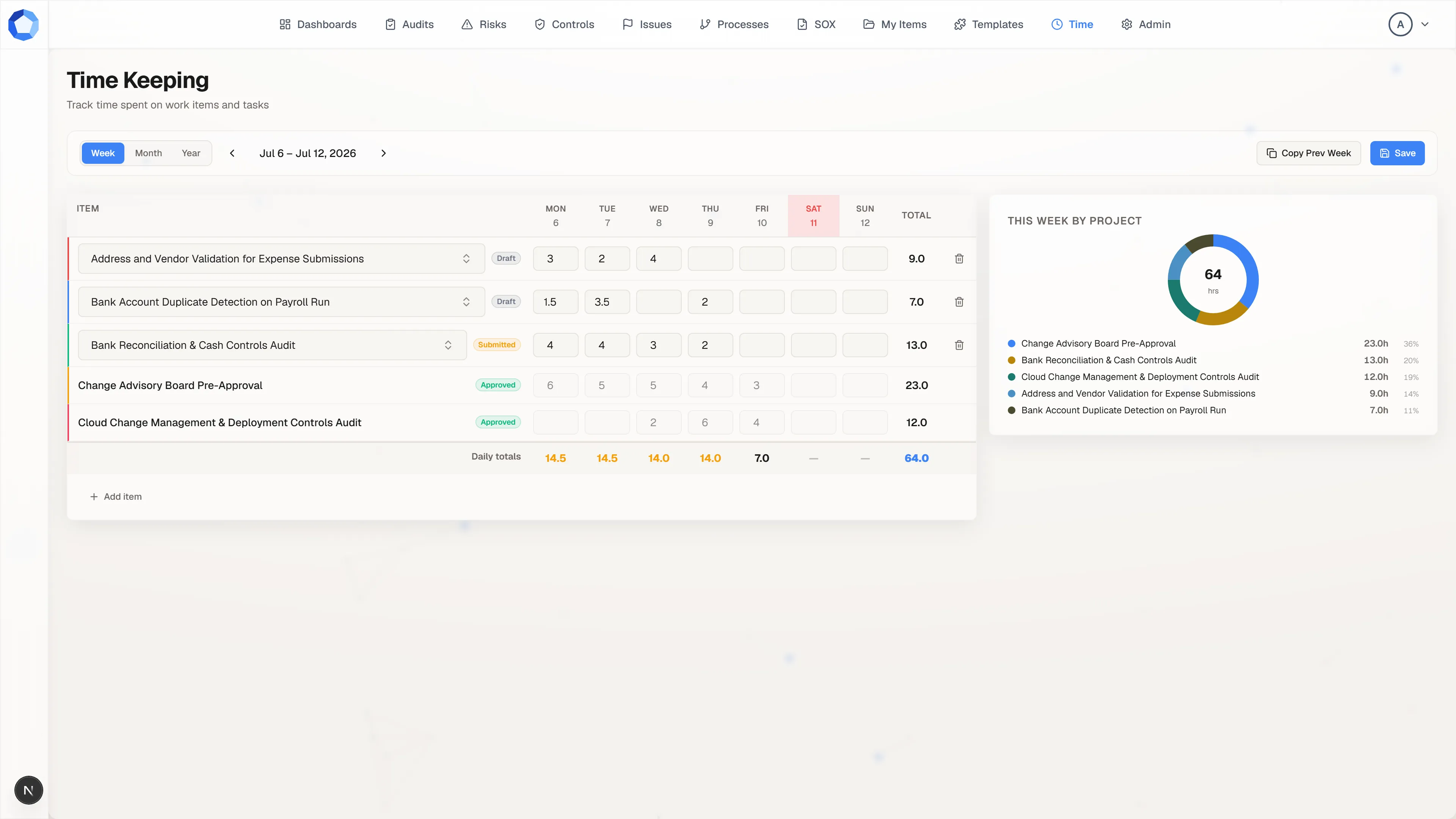
Your week, one row at a time
Section titled “Your week, one row at a time”The grid holds one row per item and one column per day, Monday through Sunday, with today’s column picked out in red. Each row totals across the week on the right, each day totals down the bottom in Daily totals, and the grand total sits in the corner.
The arrows beside the date range move you between weeks, and the Week, Month, and Year tabs swap the grid for a chart of weekly hours or monthly hours when you want the wider view.
Log as you go
Section titled “Log as you go”Add item at the bottom of the grid adds a row. Pick the item from the
row’s selector, then type hours into the days you worked on it: whole hours
or fractions such as 1.5 both work. One row covers one item for one week,
so returning to the same item later in the week means filling another day on
the existing row.
Copy Prev Week, in the toolbar, brings last week’s rows forward so a steady week starts from a filled grid instead of an empty one. The panel on the right totals the week by item as you go, which is the quickest way to catch hours logged against the wrong thing.
Save the week
Section titled “Save the week”Nothing is stored until you press Save, which writes every row on the grid at once. The button reads Save Changes while you have edits outstanding, and leaving the page or closing the tab with unsaved edits warns you first.
Two limits apply as you save: a day cannot total more than 24 hours across all your rows, and the same item cannot appear twice in the same week.
Watch the state beside each row
Section titled “Watch the state beside each row”The badge next to each item says where that entry stands. New rows are
DRAFT and entirely yours. Once submitted for review they read
SUBMITTED, and editing one at that point returns it to draft, so it has to
go back for review again.
Approved entries lock: the hours grey out, the row loses its selector and its delete control, and the week’s history stops moving. If an approved entry is wrong, ask a reviewer rather than trying to edit it.
Entry states
Section titled “Entry states”| Status | Meaning |
|---|---|
DRAFT |
Yours to edit. Not yet sent for review. |
SUBMITTED |
Sent for review, waiting on a decision. |
APPROVED |
Accepted. The entry is locked and can no longer be edited or deleted. |
REJECTED |
Declined by a reviewer. |
A rejection comes back to you as an editable entry with the reviewer’s reason recorded on it, so the correction and resubmission happen on the same row rather than as a new one.
Review, from the other side
Section titled “Review, from the other side”Reviewing time is an administrator’s job. Reviewers work from a queue of submitted entries and can summarize hours by person, by item, or by week before deciding, so a decision is made against the shape of the week rather than one row at a time.
That is also why the item on a row matters as much as the hours: a reviewer reads time as effort spent per piece of work, and hours parked on the wrong item distort every summary built on them.
Where the numbers surface
Section titled “Where the numbers surface”Saved hours feed the time aggregates that dashboards and reports read, so a week left unsaved is a week missing from everyone else’s picture of capacity. Log as you go rather than reconstructing a week on Friday afternoon.