Concepts
The object model
Seven objects, and the rules between them. Read this page once and every other page in the documentation has somewhere to hang.
AssureSwarm ships with almost no opinions about your work. It ships with a small set of objects and some strict rules about how they connect, and your administrators assemble those into whatever your team actually does. This page is the map; each concept below has a page of its own.
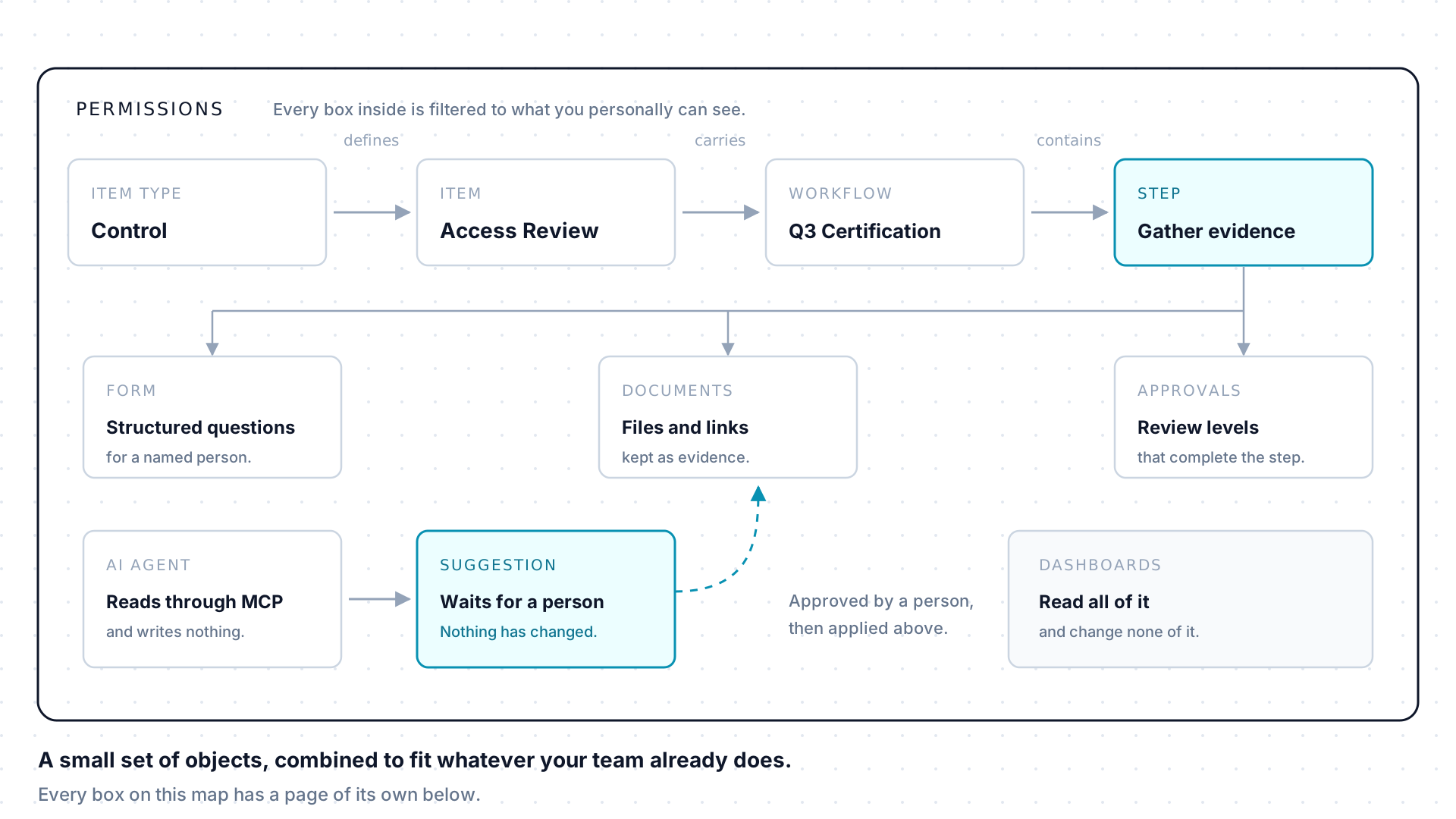
The seven concepts, in reading order
Section titled “The seven concepts, in reading order”An item type is a class of record your administrators define: a control, a risk, an issue, a vendor. It sets the fields those records hold, the statuses they move through, and whether they can run workflows or link to each other. An item is one record of that type, and each active type is a page in the top navigation. Nothing in the product is named by us: what you see is what your tenant configured.
A workflow is repeatable work attached to an item, made of ordered steps. It starts either from a reusable template or as a diagram drawn directly, and once running the two behave identically. A step has no assignee field: people reach it as approvers or as form respondents, and its status is derived from its approvals rather than set by anyone. Decision points route the run, and branches not taken can be pruned away.
A form is a set of structured questions carried by a step. An assignment asks one named person, by email, to answer it, and their response is recorded on the step with the time it arrived. Because the answer is scoped to a step, somebody outside your team can answer one question without seeing the workflow around it, which is what makes forms the safe way to ask an external auditor or a vendor contact for something.
A document is a file or an external link attached to a step. Uploaded files are held in your tenant and checked before they count as evidence; links are addresses to something that lives elsewhere. There is no separate file library by design, so every piece of evidence stays next to the work that produced it and inherits the reach of the step it hangs off.
Permissions decide who can sign in at all, which pages exist for them, and which individual records they can reach. Each layer narrows the one outside it and none of them widens it, which is why two colleagues often see different navigation. An agent connects inside one person’s boundary, so it can never reach further than they can.
Agents and the in-app AI never write to your data. Every proposed create,
update, delete, form submission, and branch prune lands as a suggestion in
pending, and a person approves, rejects, or edits it first. Approving applies
the change as the approver, under the approver’s own permissions, and the
outcome lands in the activity trail like any other edit.
A dashboard is a page of widgets over live queries: stat tiles, charts, tables, and filters reading your items, workflows, forms, and time entries. It stores its configuration and never its numbers, so every widget runs as whoever is looking. Dashboards read and never write, which is why they are the one surface you can leave open all day.
How a typical tenant uses it
Section titled “How a typical tenant uses it”Concepts rarely show up in isolation. A tenant running a controls-testing program configures a Control item type to hold one item per control, and attaches a testing workflow with a step for each testing period. Each step’s form asks the control owner to describe the test performed and attach evidence, and submitting it adds a document to the step. One or more approvers sign off at each configured review level before the step is complete. A dashboard built on a due-date report surfaces which steps are overdue. An agent connected through MCP reads the control’s history and drafts a summary as a suggestion: the control owner opens a preview and approves before anything is saved.
Terms in one line
Section titled “Terms in one line”| Term | Meaning |
|---|---|
| Item type | The configured type that defines an item’s fields and behavior. |
| Item | A record in AssureSwarm. |
| Field | Structured data stored on an item or workflow object, identified by a field key. |
| Custom list | A tenant-wide reusable list of values, used by select and multiselect fields. |
| Relationship | A typed link between two items: parent, child, sibling, or related. |
| Workflow | A structured set of steps attached to an item. |
| Step | A unit of work inside a workflow. |
| Approver | A person assigned to review and approve a step. |
| Review level | A stage of approval a step must pass through. |
| Form | A structured set of questions attached to a workflow step. |
| Form assignment | The request that asks one person to answer a step’s form. |
| Document | A file or external link attached to a workflow step. |
| Suggestion | A proposed change awaiting review. |
| Dashboard | A configurable page of metrics, charts, tables, and filters. |
Where to go next
Section titled “Where to go next”- Getting started: a first hour in the product, end to end.
- Using AssureSwarm: the task guides that sit on top of this model.
- Admin guide: configuring the item types, permissions, and templates the model runs on.
- Reference: the complete glossary, MCP scopes, and platform limits.