Admin Guide · Setup
AI integrations
Turning on an AI platform does not hand it your tenant. It lets each person connect it to their own account, under their own permissions, with every write still waiting on a human. Scroll the three surfaces that make that true.
- Enable
- Connect
- Watch
Scroll
AI Integrations, from the Administration page, is the tenant-wide half of agent access. The other half belongs to each person: you decide which platforms may connect at all, and they decide whether to connect one to their own account.
Enable a platform
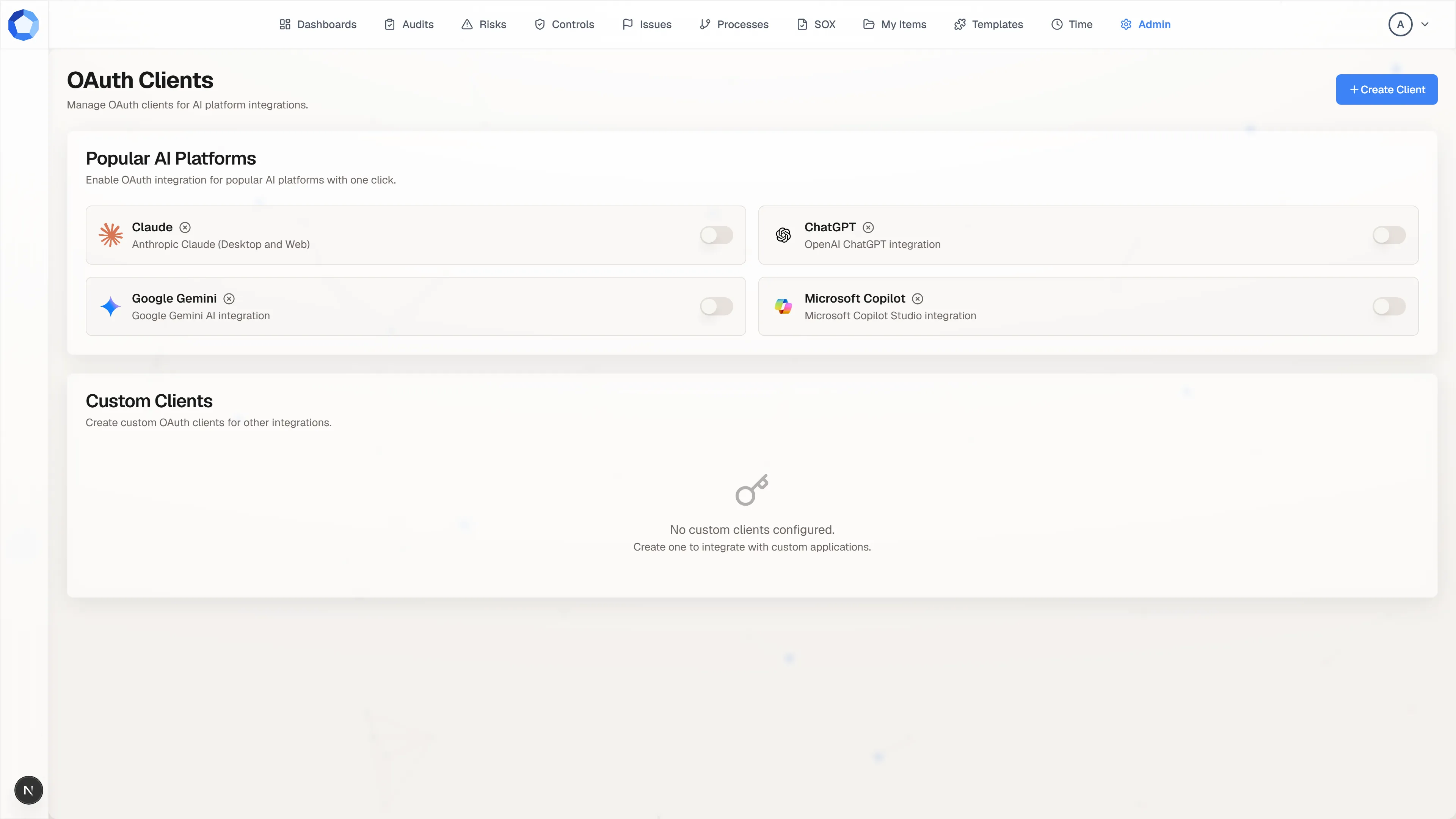
Section titled “Enable a platform”Popular AI Platforms carries a card each for Claude, ChatGPT, Google Gemini, and Microsoft Copilot, with a toggle on the right of each. Turning one on registers an OAuth client for that platform in one action, with its redirect URIs already correct, and turning it off withdraws the integration for everyone at once.
If enabling a platform produces a client secret, it appears once in a dialog. Copy it then. Rotate issues a replacement later and the old secret stops working immediately, so rotate only when you are ready to update whatever holds the current one.
What each person does next
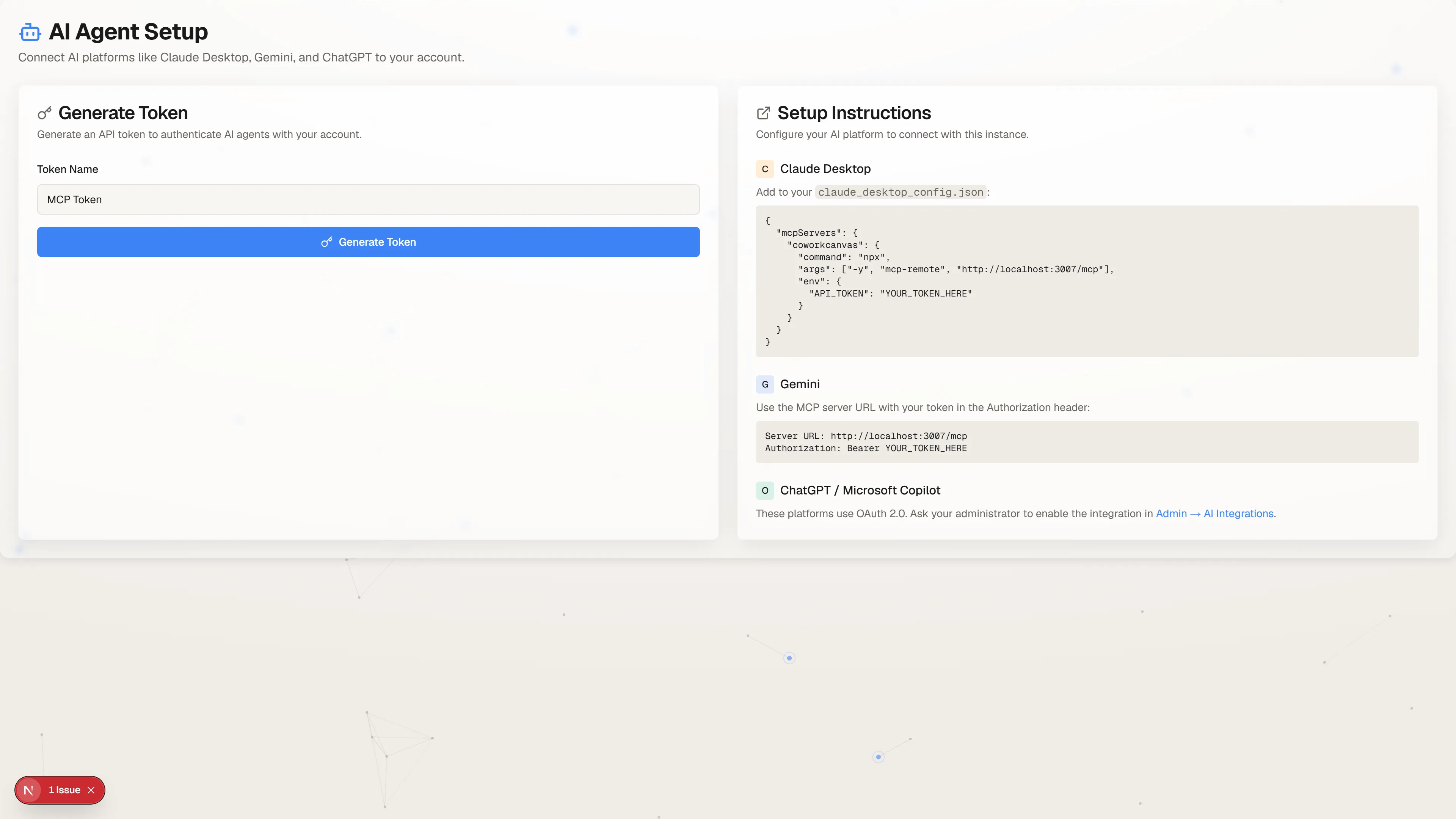
Section titled “What each person does next”Enabling a platform does not connect anybody. Each person opens AI Agent Setup from their own avatar menu, names a token, and presses Generate Token. The token is theirs, it expires in 30 days, and it is shown exactly once: the page says so, and a lost token is replaced rather than recovered.
That page also lists the tokens they already hold, with an expiry date and a Revoke for each. Revoking is immediate, and any agent still using that token needs a new one. Point people here rather than minting anything on their behalf, because a token that acts as them should be created by them.
Watch it run
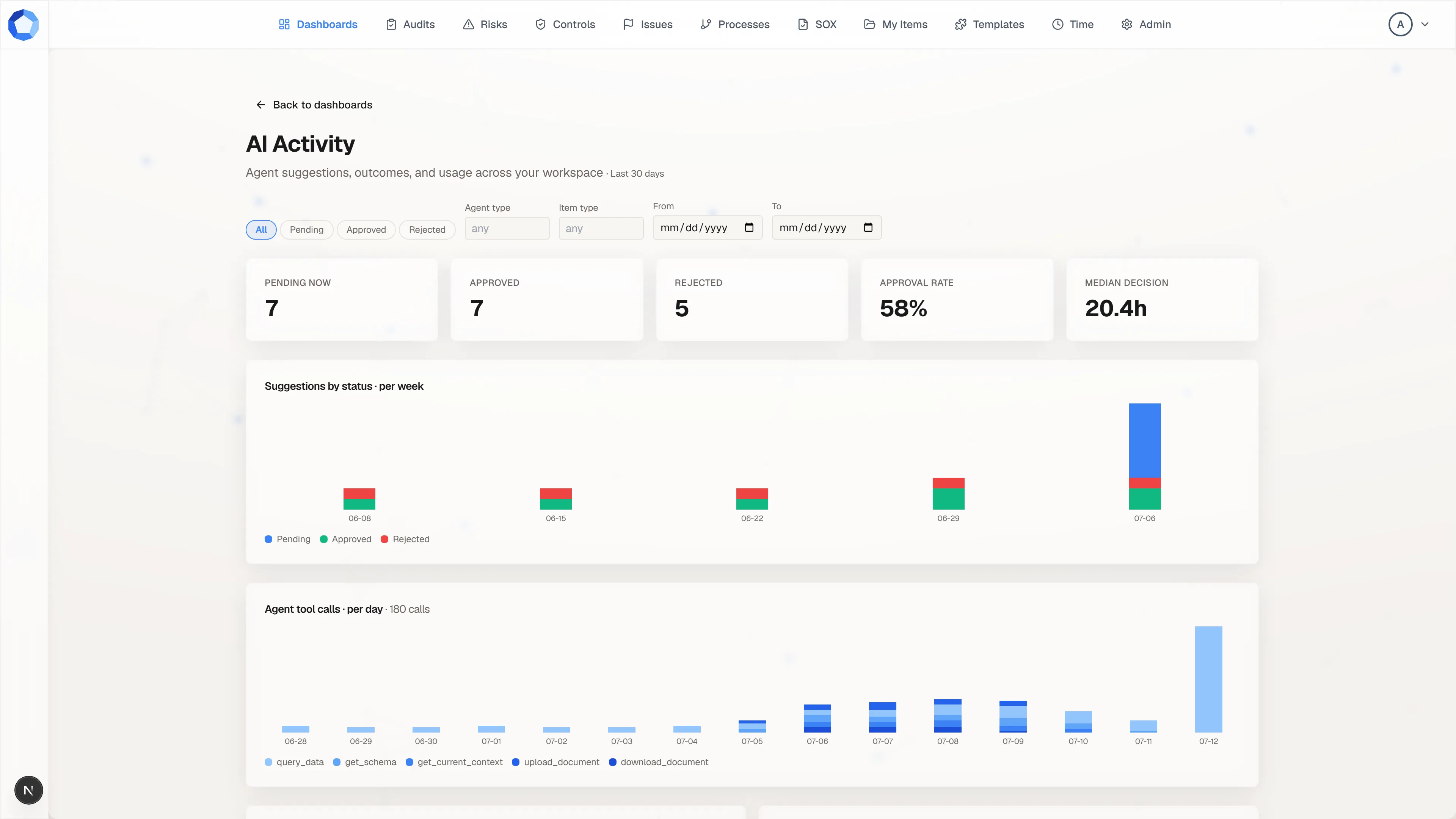
Section titled “Watch it run”The AI Activity dashboard is your standing answer to what the agents are actually doing. The tiles across the top count suggestions pending now, approved, and rejected, then give you the approval rate and the median time a decision takes.
Read the approval rate as a quality signal about the agent, not about your reviewers. A rate near the floor usually means an agent’s instructions or its scopes need narrowing; a long median decision time usually means the review queue needs an owner.
The two ways an agent gets in
Section titled “The two ways an agent gets in”| OAuth client | Personal token | |
|---|---|---|
| Audience | An AI platform many people in the tenant use. | One person, for their own use. |
| Who authorizes | Each person authorizes the client for themselves, then the agent acts within that person’s access. | The person generates it for themselves. |
| Lifetime | Until the client or the authorization is revoked. | 30 days, then it expires. |
| Your control | Register the client, restrict its scopes, deactivate it. | Indirect: deactivate the user, or wait for expiry. |
Both paths end in the same place. Whichever one an agent arrives through, it is acting as exactly one person and can never exceed what that person could do by hand.
Custom clients
Section titled “Custom clients”Custom Clients, below the platform cards, is for anything not on the list. Create Client asks for a name and the redirect URIs the platform publishes, which you take from that platform’s own setup documentation rather than inventing.
Most AI platforms register as public clients: they authenticate with PKCE and hold no secret. A confidential client holds a secret and authenticates with it directly. Which kind you are creating is the platform’s decision, not yours.
Compatible MCP clients can also register themselves, discovering the tenant’s OAuth configuration at:
https://<tenant>.assureswarm.com/.well-known/oauth-authorization-serverSee the MCP overview for the endpoints behind any platform’s setup flow.
Scopes
Section titled “Scopes”Each MCP tool requires a scope:
| Tool | Required scope |
|---|---|
get_schema |
read:data |
query_data |
read:data |
get_current_context |
read:context |
get_step_context |
read:workflows |
upload_document |
write:documents |
download_document |
read:documents |
suggest_change |
write:suggestions |
A client that requests authorization without naming scopes receives a default
grant: openid profile email read:context read:items read:workflows read:dashboards read:documents read:suggestions write:suggestions read:data write:documents. That is broad reading, document upload, and suggestions. It is
not direct writes to items, workflows, or dashboards, because those always go
through a suggestion regardless of scope.
Narrowing a client’s allowed scopes below that default is your sharpest tool.
Restrict a reporting agent to read:data and read:context and it cannot call
suggest_change or upload_document however it is prompted. See
Permissions for the full scope catalog.
Why broad scopes are less alarming than they look
Section titled “Why broad scopes are less alarming than they look”Even with every scope and full permissions, an agent’s write path ends in a proposal. suggest_change creates a pending suggestion, never an applied change, and a person approves it under their own permissions.
Scopes decide what an agent may attempt. People still decide what happens to your data.
Cutting access off
Section titled “Cutting access off”Match the revocation to what you are actually trying to stop:
| Situation | Action |
|---|---|
| The integration itself is the problem | Toggle the platform off, or deactivate the custom client. Every user connected through it loses access at once. |
| One person should no longer have access | Deactivate the user in User Permissions. That stops everything acting as them, OAuth and personal token alike. |
| One token is suspect | Have its owner revoke it on their AI Agent Setup page. It stops working immediately. |
| Nothing is wrong and you can wait | Personal tokens expire on their own in 30 days. |
Reach for the narrowest action that solves the problem. Turning a platform off because one person misused it takes the tool away from everyone else too.
What lands in the log
Section titled “What lands in the log”Registering a client, toggling a platform, rotating a secret, and deactivating a
client are all recorded in the activity log as
oauth-client entries with the administrator who made the change. Individual
suggestions record the proposing agent and the person who decided, so any single
change an agent made is traceable end to end.