Concepts
How records are shaped
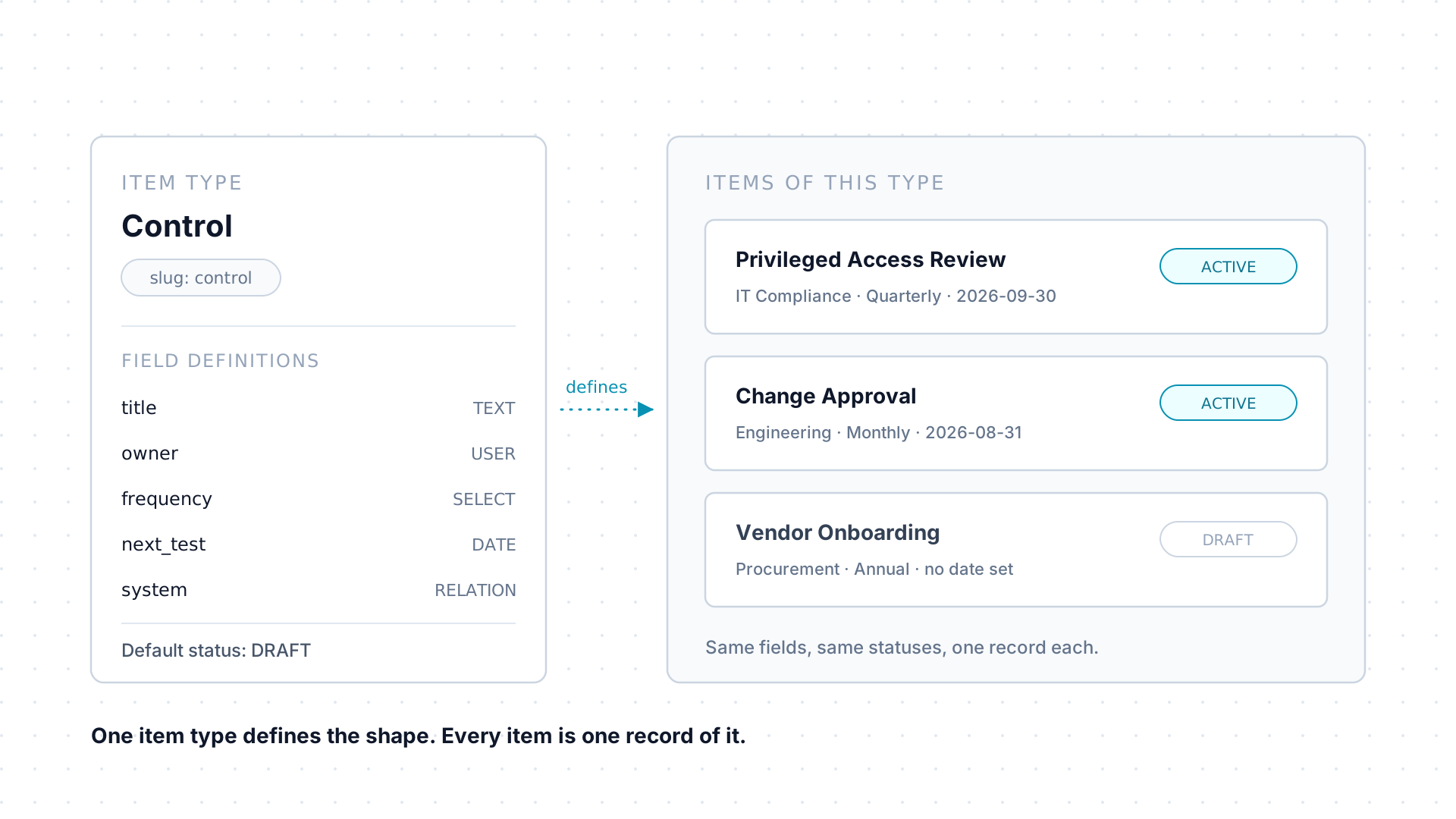
An item type defines a class of record, an issue, a risk, a control, a vendor, and every item is one record of that type. Scroll through the moving parts, then dig into the reference below.
- Types
- Fields
- Links
- Access
Scroll
Nothing on your screen is named by us. The record types, their fields, and their statuses are all configured in your tenant, which is why this page describes a model rather than a fixed list. If you are the one configuring it, see Item types and fields.
One definition, many records
Section titled “One definition, many records”An item type is the definition: a stable slug used by imports, agents, and the API, a name and plural name, an icon and color, a display order, and a default status applied to every new record. An item is one record of that type.
Two switches on the type decide what its items support: whether they allow workflows, and whether they allow relationships. Each active type is also a page in the top navigation, listing its items.
Fields carry the substance
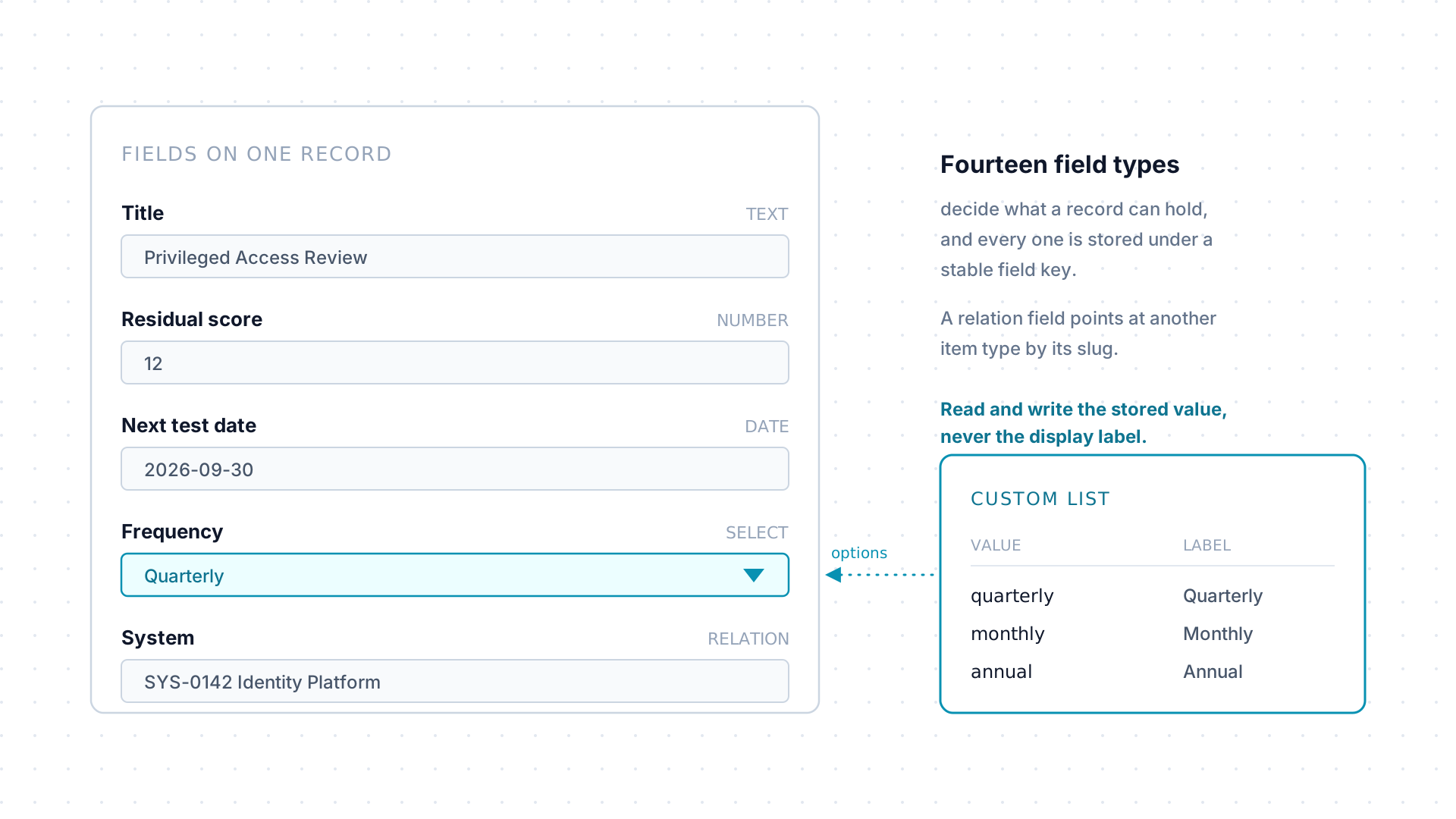
Section titled “Fields carry the substance”Beyond a title, a status, and an optional due date, everything an item holds lives in fields, stored under a field key rather than a display label. There are fourteen field types, from plain text through dates and numbers to references to other users and other items.
A select or multiselect field can draw its options from a custom list, a tenant-wide vocabulary with a stored value and a separate display label. Imports, queries, and agents always read and write the stored value.
Records connect to records
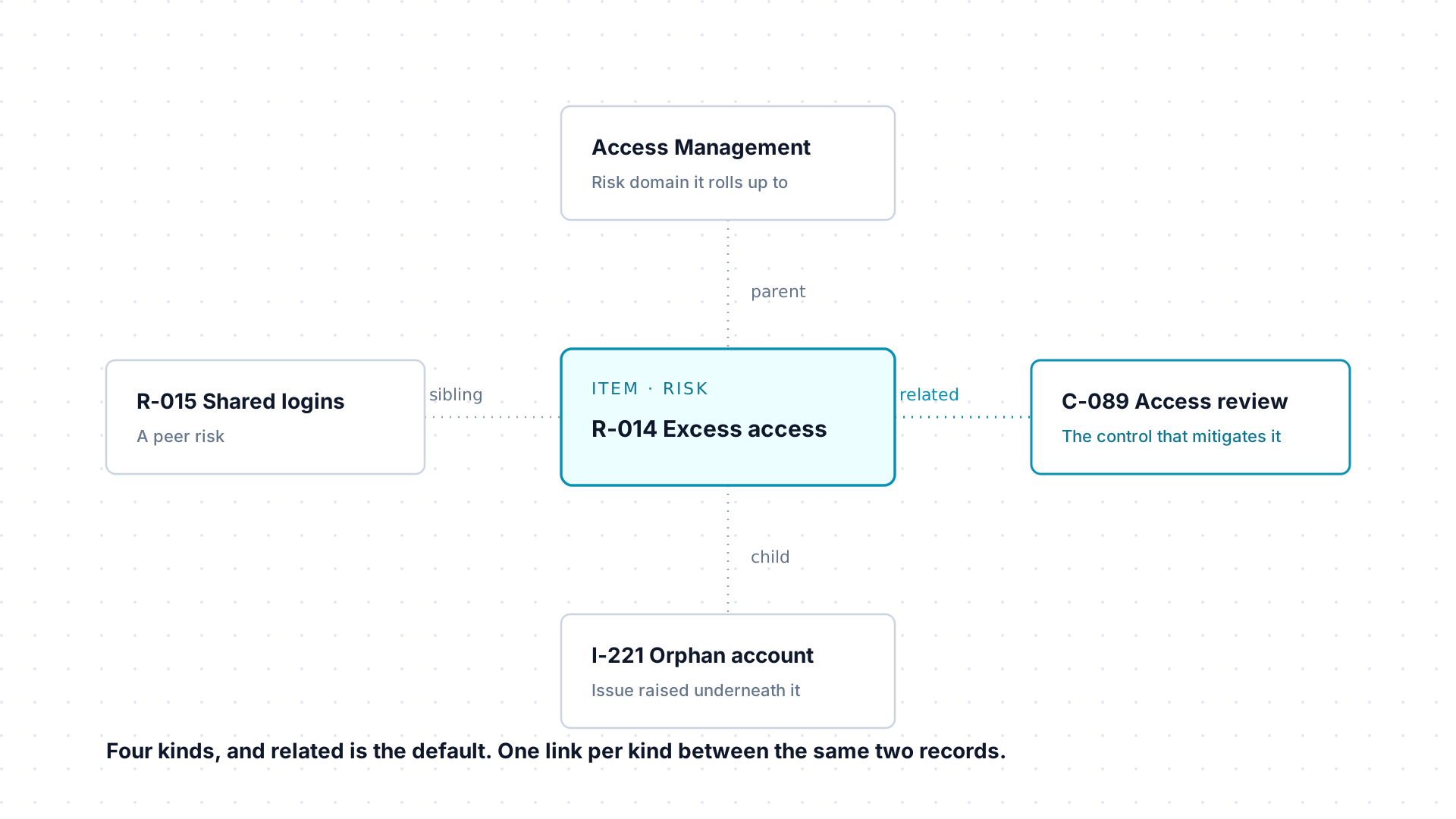
Section titled “Records connect to records”A relationship links two items and carries a kind: parent, child,
sibling, or related, and related is the default. A given pair of
records can hold at most one relationship per kind between them.
Use them to model the connections your work already has: a risk and the controls that mitigate it, an issue and its remediation, a control and the system it runs on. The item type has to have relationships enabled first.
Owners say who is responsible, permissions say who can look
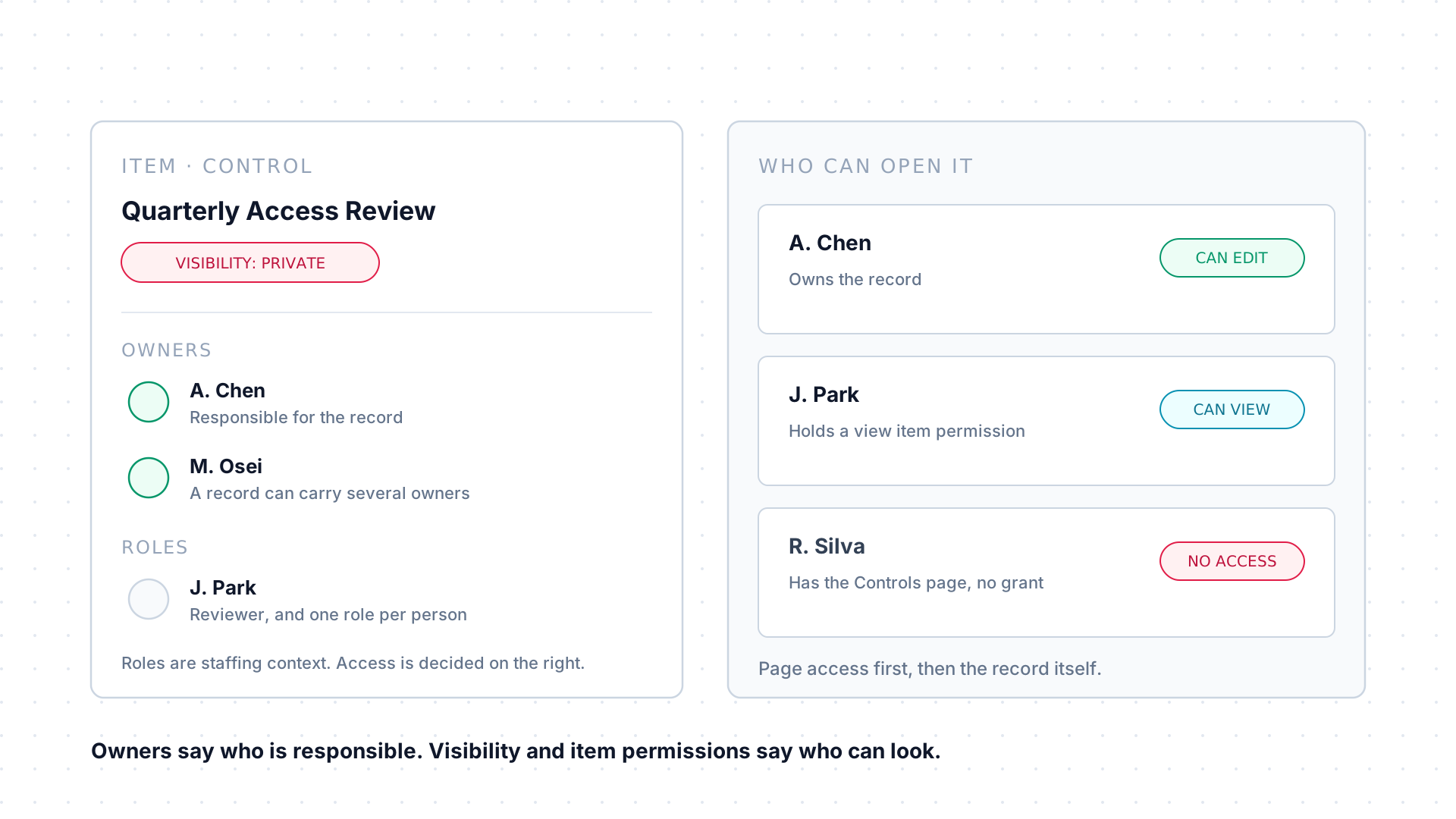
Section titled “Owners say who is responsible, permissions say who can look”Every item has one or more owners and a creator, and it can carry item roles, named staffing assignments such as a reviewer or a point of contact, with at most one role per person per record.
Access is a separate question. An item’s visibility is either public,
readable by anyone holding its item type’s page, or private, open only to
its owners and to anyone granted it explicitly. That explicit grant is a
per-user item permission, carrying view or edit on one record. Both
sit underneath page access: see Permissions.
Item types, in detail
Section titled “Item types, in detail”| Part | What it sets |
|---|---|
| Slug | The lowercase identifier used by URLs, imports, agents, and the API. It cannot be changed after creation. |
| Name and plural name | The labels people read, in the navigation and in lists. |
| Description | What the type is for. |
| Icon and color | How the type is recognized across the app. |
| Display order | Where the type sits in the navigation. |
| Default status | The status applied to a new record when nothing else sets one. |
| Allow workflows | Whether items of this type can run workflows. |
| Allow relationships | Whether items of this type can participate in relationships. |
Item types are deactivated, never deleted, once they are in use. Deactivating hides a type from new work and from the navigation without touching the records already created under it.
What an item carries
Section titled “What an item carries”Every item has a title, a status drawn from the statuses configured for its type, an activity history, and an optional due date. Custom data lives in fields. You can favorite the items you keep returning to, and deleting an item is a soft delete: it disappears from lists and from its item type page, and an administrator can help recover it.
The field types
Section titled “The field types”| Field type | Stores | Notes |
|---|---|---|
TEXT |
A single line of text | No |
TEXTAREA |
Multiple lines of plain text | No |
RICHTEXT |
Formatted text | No |
NUMBER |
A number | No |
DATE |
A calendar date | No |
DATETIME |
A date and time | No |
SELECT |
One value from a list of options | Options come from the field itself or a custom list |
MULTISELECT |
One or more values from a list of options | Options come from the field itself or a custom list |
BOOLEAN |
True or false | No |
USER |
One tenant user | No |
USERS |
Multiple tenant users | No |
RELATION |
A link to one other item | Points at a configured related item type |
RELATIONS |
Links to multiple other items | Points at a configured related item type |
JSON |
Structured JSON data | No |
Beyond its type, each field configuration carries a required flag, validation rules, a default value, a help description, a display order and grouping, and switches for whether the field is filterable and searchable. Like item types, fields are deactivated rather than deleted once they hold data.
Relationships, in detail
Section titled “Relationships, in detail”A relationship records a kind between two items, and the same pair can be
linked more than once as long as each link uses a different kind. The four
kinds are parent, child, sibling, and related, with related as the
default when nothing else is chosen.
Steps inside a workflow can link to items too, beyond the workflow’s own item, which is how a piece of work stays tied to whatever it actually touches. See Workflows.
Ownership and roles
Section titled “Ownership and roles”Owners are the people primarily responsible for a record, and there can be more than one. The creator is recorded separately and does not change. Item roles are a different axis: named personnel assignments that give staffing context, such as a reviewer or a point of contact, with one role per person per item.
Visibility and access
Section titled “Visibility and access”The visibility field holds one of two values. A public item is visible to
anyone who has the item type’s page; a private item is restricted to its
owners and creator. On top of that, per-user item permissions grant view or
edit on an individual record. Seeing anything always starts with page access:
you need the item type’s page before any of its records can reach you.
Working with items is the day-to-day procedure for finding, creating, and updating records.